Process Access Control List (ACL)
Process ACL controls who can view or administer a process beyond the default system-administrator access. Use this page when process access needs to be delegated or restricted more precisely.
Quick Decision Guide
Use this page when one specific process needs different access from the domain default.
- Use a security profile when the same baseline rules should be reused across many objects.
- Use additional permissions when one process needs an exception for a specific user, position, department, or group.
- Use Relationship Between Folders and Process Design Permissions when the ACL looks correct but the final behavior still seems inconsistent.
Security Profiles
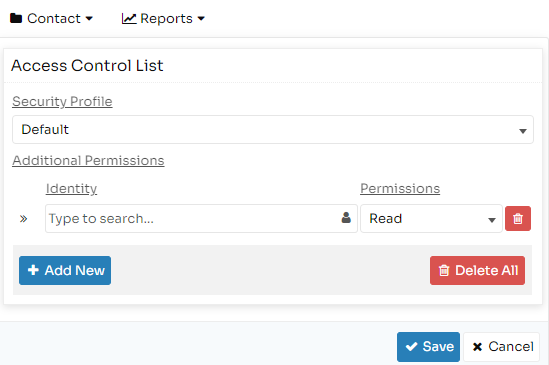
Security profiles are selected first and provide the baseline access rules for the process.
The existing documentation states that these profiles are defined under the domain administration security-profile area and can include:
- users
- positions
- departments
- user groups
Additional Permissions
Additional permissions are used when access must be granted to, or restricted from, identities that are not adequately covered by the selected security profile.
These entries can supplement or override the baseline profile.
Use this section for targeted exceptions, not for the default access model of the whole domain.
ACL Entry Fields
Identity
User, position, department, or user group that the rule applies to.
Permissions
Supported documented permission levels:
- Write: can edit process design and change version state
- Read: can view process starting points in active mode and access related reports
- All: treated as process administrator and can access administrative functions and view starting points in test mode
Type
Controls whether the permission is granted or denied:
- Allow
- Deny
Begins At
Date when the permission starts to apply.
Expires At
Date when the permission stops applying.