SSL Termination
SSL Termination explains how Emakin behaves when TLS is terminated by a reverse proxy or load balancer instead of by the application itself.
Emakin can serve SSL directly through host configuration, but it also supports proxy-based SSL termination.
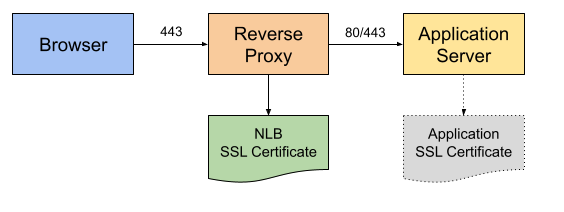
Deployment Model
In the documented proxy model:
- the browser connects to the reverse proxy over HTTPS
- the reverse proxy handles SSL/TLS
- the connection from the proxy to Emakin may be HTTP or HTTPS
Emakin only trusts loopback proxy addresses by default and requires additional configuration when the reverse proxy uses an external IP.
Forwarded Headers
Emakin uses these forwarded headers to understand the original request:
X-Forwarded-Proto
Original request scheme (http or https).
X-Forwarded-For
Original client IP and proxy chain.
Warning: If this header is missing, audit logs may record the reverse-proxy IP instead of the real client IP.
X-Forwarded-Host
Original Host header from the client request.
Enabling Forwarded Headers
If the reverse proxy does not use a loopback address, update the configuration.
By Configuration File
Example:
1 2 3 4 5 6 7 8 | |
By Environment Variables
Environment-variable example:
1 2 3 | |
Diagnostics
Emakin provides a diagnostics page for inspecting request headers when the application runs in the development environment.
Start in Development Environment
Example:
1 2 3 4 | |
Then start web mode:
1 | |
Docker example:
1 | |
Header Diagnostics Page
The documented diagnostics path is:
1 | |
When reviewing the diagnostics page, pay attention to these fields:
- Request Scheme should be
httpsfor SSL-originated requests - Host must identify the correct tenant
- Request RemoteIp represents the client IP when forwarding is configured correctly