Assign a Task to a Manager
Scenario
Use this example when the next task should automatically go to the manager of the selected person or initiator.
What You Will Learn
- resolve a manager through a role expression
- assign the resolved role to an approval task
- verify task ownership with organisation data
Difficulty and Estimated Time
- Difficulty: Intermediate
- Estimated time: 15 minutes
Assumed Knowledge
You should be familiar with roles, process data paths, and JavaScript expressions.
Required Reading
Prerequisites
- permission to create processes and roles
- organisation data with manager relationships already defined
- access to role expressions in the process designer
Steps
Create the Process and Tasks
- Create a process and open it in edit mode.
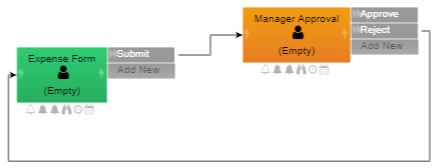
- Build two tasks:
- the initial form task
Manager Approval- Add
ApproveandRejectactions to the manager task. - Route
Rejectback to the first task if you want resubmission.
Create the Manager Role
- Add a new role named
Manager. - Set the role type to Expression.
- Choose JavaScript as the expression language.
- Use a manager lookup expression such as:
1 | |
This expression routes the task to the manager of the identity selected on the form. If your design should instead use the process initiator, you can adapt the expression accordingly.

Assign the Role to the Task
- Return to the process designer.
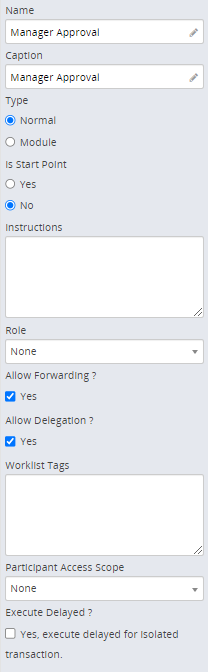
- Select the
Manager Approvaltask. - Choose the
Managerrole in the task settings.
Test the Process
- Commit the process changes.
- Start the process from the folder.
- Submit the first task with a selected person.
- Verify that the approval task appears for that person's manager.
Result
The approval task is now routed automatically to the manager resolved from organisation data.
Verify the Result
Start the process as a user with a configured manager and confirm that the manager receives the approval task. Repeat with a test user who has no manager and confirm that the process follows the documented fallback or reports a clear configuration error.
Security and Portability Notes
- Resolve the manager from organisation data in the current domain; do not copy a manager user ID between domains.
- Define an explicit no-manager outcome so an instance cannot become silently unassigned.
- Confirm that the resolved manager is authorised to see the form data before using this pattern with sensitive data.