Auto-Select Rule
An auto-select rule automatically chooses an action based on a defined condition, eliminating the need for user interaction. The condition can be a Decision Table or a scripting expression.
When the Rule Runs
The rule runs on the server when the task is created, after the prework script:
- If the prework script has already selected an action, auto-select rules are not evaluated.
- Otherwise, the rules of the task's actions are evaluated in action order. The first rule that returns
trueselects its action and completes the task without user interaction. - If no rule returns
true, the task is assigned to its participants as usual.
Rules are evaluated for user tasks and module tasks alike.
Choosing Between a Rule and a Prework Script
Use an auto-select rule for a declarative condition on the form data, such as skipping an approval below an amount limit. The rule should only observe the data and return true or false.
Use the prework script instead when the decision needs several steps, queries, or changes to the data before the action is selected.
The rule has the same objects as other server task scripts; see Script Contexts.
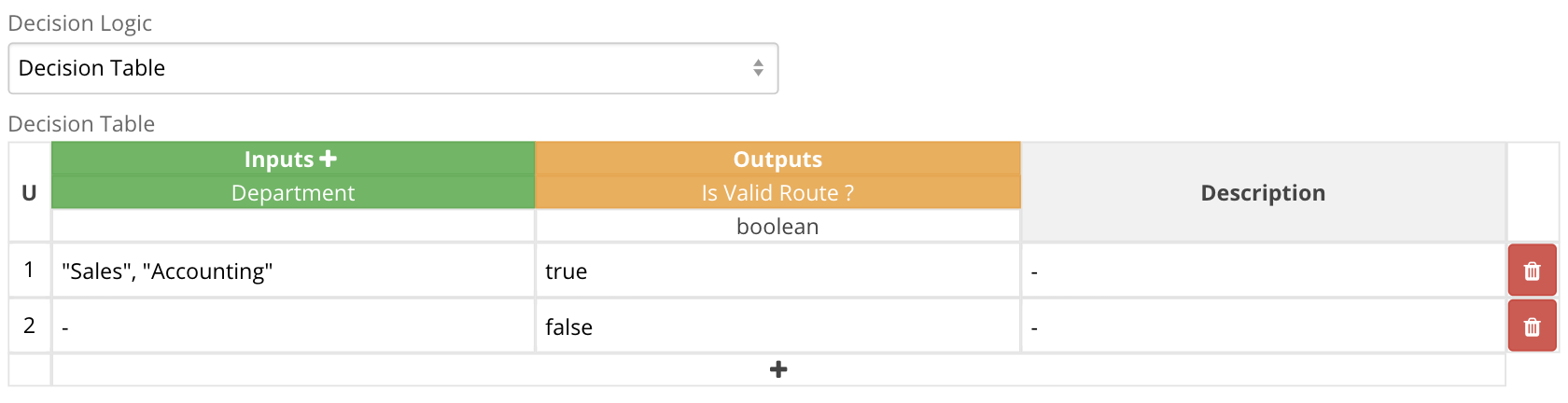
Auto-Select with Decision Table
This example uses a decision table to automatically select an action if the "Department" field is "Sales" or " Accounting". Other values invalidate the rule.
Auto-Select with Expression
This example uses a FEEL expression:

The equivalent JavaScript expression:
