Database Settings
Database Settings configures the storage backends used by Emakin. The preserved documentation describes three storage categories: relational SQL databases, file repositories, and XML repositories.
Use this page during installation and when you need to change how Emakin stores operational, archive, file, or XML data.
Environment Variable References
Sensitive connection values can be stored by using environment-variable placeholders instead of writing secrets directly into Host Administration fields.
Supported syntax:
1 | |
Supported usage patterns:
1 2 | |
Notes:
- placeholder resolution is applied at runtime and during Test Connection
- the raw
${...}text remains stored in Host Administration configuration - if a referenced environment variable is missing, validation or runtime startup fails with an explicit error
- environment variable names must use letters, digits, and
_; names containing.or-are not supported
System Connection
The system connection stores the application’s system tables.
Use Test Connection to verify connectivity before startup.
Replicate Fulltext Database
The documentation notes that full-text content is stored in the local file system of the agent machine and can also be replicated into SQL storage for synchronization with other agents.
It also notes that in large deployments this synchronization may reduce performance, and recommends using a central file system location with replication disabled when the full-text database becomes very large.
Archive Connection
The archive connection is used for archived records. Older data can be moved into this storage when a larger but slower archive area is preferred.
Repository Connections
At least one repository connection is required for normal application behavior. Repository databases store domain tables, and multiple repositories can be created.
The preserved documentation states that tenant-related data is sharded across repositories.
Use Test Connection to verify connectivity.

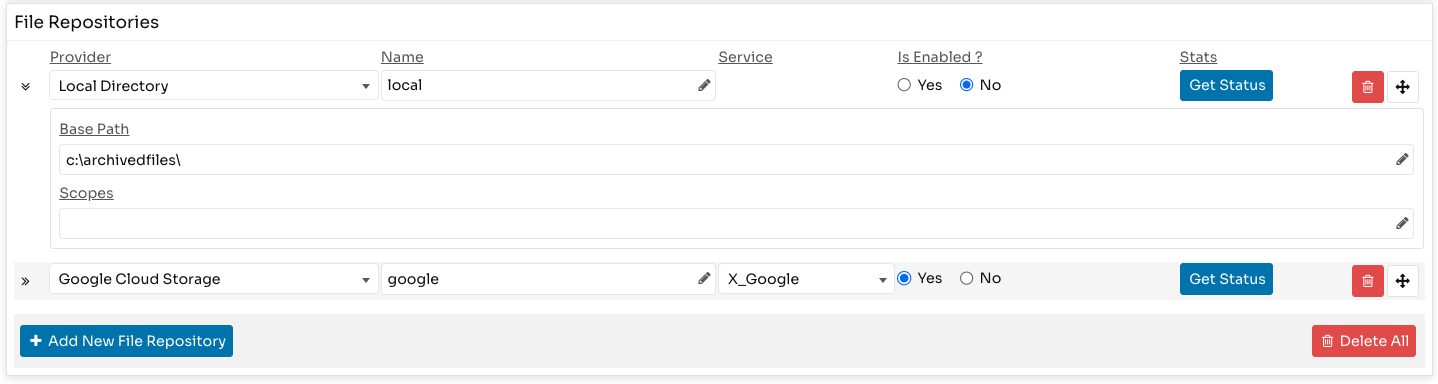
File Repositories
File repositories store uploaded files outside SQL storage.
Use them when file size growth would otherwise affect SQL performance.
The preserved documentation states:
- file repositories are optional
- multiple file repositories can be configured
- local network storage and S3-compatible repositories are supported
- when a new file repository is added, existing SQL-stored files are moved to it
- files are replicated across all configured file repositories
The Get Status button shows replication status.
XML Repository Connection
XML repositories store domain and process-related XML data.
Connection-string fields in this page also support the environment-variable placeholder format described above.

Database Maintenance Scripts
Host Administration includes a maintenance script executor for controlled SQL operations.
Use this area to define scripts and schedule them for specific weekdays and a daily time window.
Configuration Fields
- Is Enabled: Enables or disables scheduled execution.
- Connection Name: Target database connection (
System,Archive, or a repository connection). - Schedule Days: Weekdays selected with checklist.
- Start Time: Earliest execution time of day.
- End Time: Latest execution time of day.
- Script: SQL content to execute.
Scheduling Behavior
- Scheduling is weekday-based and time-window-based.
- A script is queued only on selected weekdays and only when current time is between
Start TimeandEnd Time. - If
End Timeis passed, execution is skipped for that day and deferred to the next valid schedule day. - Scheduled runs are guarded again at execution time, so delayed jobs that start after
End Timeare skipped. - Only one scheduled queueing is performed per day for each script.
Manual Run
- Run Now executes immediately.
- Manual execution shows a confirmation prompt and warning because SQL can modify or delete data.
- Manual execution can run edited script content directly from the UI without requiring configuration save.
Runtime Monitoring
Runtime values are shown in Host Administration and refreshed from runtime status:
- Last Executed
- Last Succeeded
- Last Failed
- Last Started
- Last Finished
- Last Duration
- Last Queued
- Last Error
- Pending/State information